3. OpenWISP
The heart of the infrastructure. The playbook of the openwisp2 repository installs in a single CT:
- the full OpenWISP: controller, monitoring, network topology, firmware upgrader, RADIUS, IPAM, notifications;
- the Wi-Fi login pages (openwisp-wifi-login-pages) for the hotspot;
- the ZeroTier controller of the node VPN;
- the nftables firewall, BIRD/Babel, the collection of router logs, the LuCI proxy.
It builds on the official ansible-openwisp2 role and adds our parts.
Before starting
- The CT from chapter 1, with
/dev/net/tunexposed. - DNS names and certificates from chapter 2 already in the CT
(
/etc/ssl/acme/ninux-nnxx.it.*and/etc/ssl/acme/luci.ninux-nnxx.it.*). - A mailbox for the OpenWISP emails (ours is
controller@ninux-nnxx.it, sent through our mail server). - Ansible ≥ 2.13 on the computer you run the playbook from.
Steps
1. Repository, roles and secrets
git clone https://github.com/mikysal78/openwisp2.git
cd openwisp2
ansible-galaxy role install -r requirements.yml -p roles/ --force
ansible-galaxy collection install -r requirements.yml -p collections/ --force
cp secrets.example.yml secrets.yml   # outside git
secrets.yml holds the RADIUS secret of the hotspots, the SMTP password, the
PostgreSQL password and the mesh key (mesh_password, 32 random characters).
Then adapt:
hosts: the inventory host name is the OpenWISP domain (openwisp.ninux-nnxx.it),ansible_hostis the CT IP;playbook.yml: Wi-Fi page domains, email, SMTP relay;owlp_organizations/: the Wi-Fi page configuration of each organization (see below).
2. First run
ansible-playbook -i hosts playbook.yml
The plays, in order:
| Play | Tag | What it does |
|---|---|---|
| 1 | — | OpenWISP, PostgreSQL + PostGIS, Wi-Fi pages, modules, cron jobs |
| 2 | zerotier |
self-hosted ZeroTier controller |
| 3 | firewall |
nftables, default drop policy |
| 4 | bird |
bird2 with Babel |
| 5 | router_logs |
rsyslog for router syslog and netconsole |
| 6 | luci_proxy |
nginx virtual host of the LuCI proxy |
First installation: freeradius
On a new CT the handler that restarts freeradius can run before nginx
answers on 443, and freeradius does not start. If that happens:
systemctl restart nginx && systemctl restart freeradius, then run the
playbook again (what is already done is not repeated).
Restoring from a backup
If you rebuild from a database backup, load the data before the first
run of the playbook: otherwise the initial script creates the
admin/admin user and the default organization, which then conflict.
3. First login
Go to https://openwisp.ninux-nnxx.it/admin: the initial user is
admin / admin. Change the password right away from
/admin/password_change/.
Then, in the admin:
- Organization: create yours (ours is Basilicata) and note the shared secret for automatic registration (Config settings): it goes into the firmware, chapter 5.
- RADIUS: Organization RADIUS settings has the UUID and token of the organization, needed by the Wi-Fi page.
- SSH credentials (Access credentials): the key OpenWISP uses to log into the routers for commands, firmware upgrades and LuCI. Enable auto add, so it is assigned to every new device (ours is called OpenWISP Default Ssh).
- Router LuCI theme: the NINUX firmware (every device except x86) ships
the luci-theme-ninux theme,
with a Basic / Advanced switch. In Basic the router's user only sees
the essential pages (overview, Wi-Fi, interfaces, password, backup and
reboot), without expert options; Advanced shows all of LuCI. Logo, name
and colours are set for everyone in the playbook (
ninux_luci_logo,ninux_luci_brand,ninux_luci_accent,ninux_luci_accent_dark), which passes them to OpenWISP asluci_*global variables; they reach the routers through the Tema LuCI ninux template of step 5. Each organization changes them, logo upload included, in the LuCI theme of the routers box of its page (openwisp-luci-theme module); a single router in its variables.luci_mode(basicoradvanced) picks the mode LuCI opens with,luci_allow_advanced(1or0) whether the switch is shown.
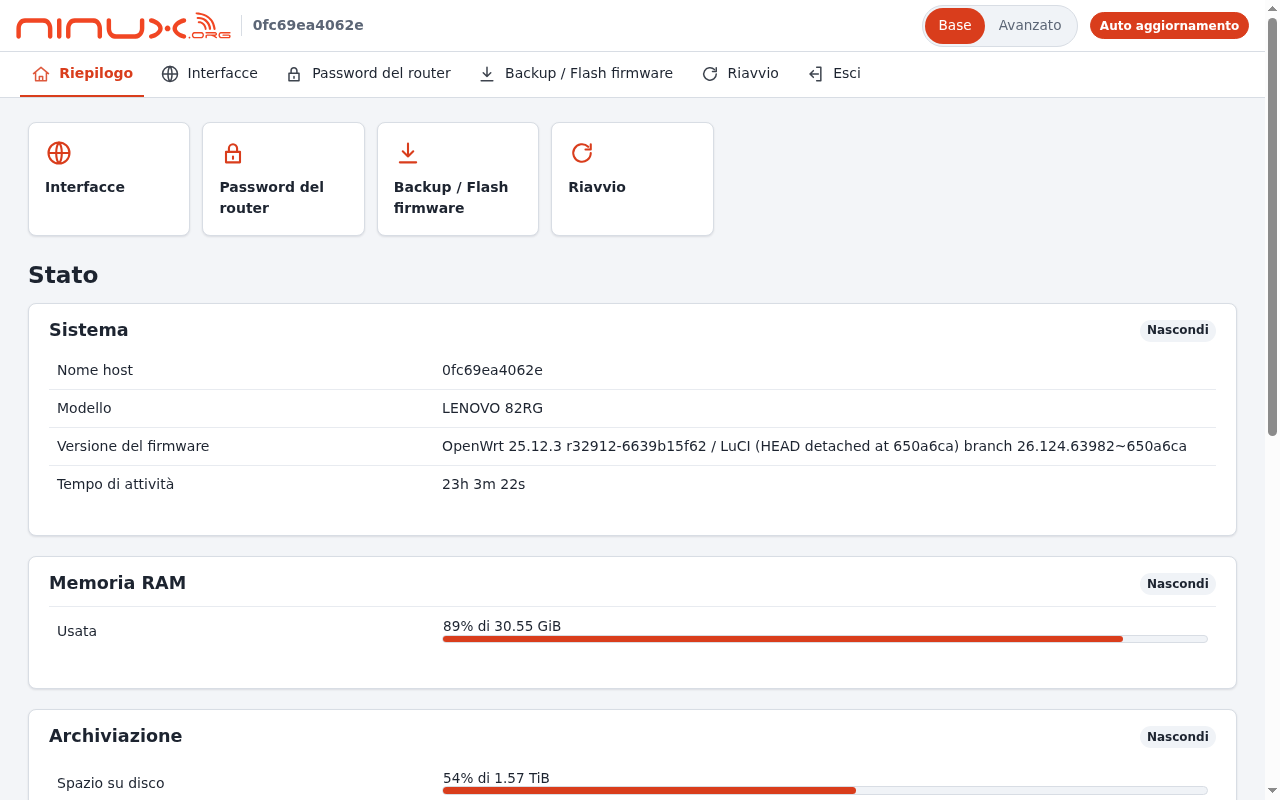
Basic mode simplifies the interface but is not access control: permissions are still those of the LuCI users.
4. ZeroTier VPN
The VPN connects remote nodes to the server and to each other, and Babel runs on it. OpenWISP is not a gateway: every node reaches the Internet through its own connection.
- Admin → VPN servers → Add: backend ZeroTier, host
127.0.0.1:9993, AuthToken = content of/var/lib/zerotier-one/authtoken.secreton the CT, subnet10.27.255.0/24. On save, OpenWISP creates the network. - Admin → Templates → Add: type VPN-client, the VPN just created, automatic tunnel provisioning enabled.
Details and checks: openwisp2 README, ZeroTier VPN.
5. Router templates
The templates are versioned in
openwisp-templates/
and are imported in the admin (Templates → Add, advanced mode </>), or from
the Django shell as explained in their
README.
Our configuration: required templates go on every router, default ones on new routers (they can be removed), the others are assigned by hand.
| Template | Default | Required | Notes |
|---|---|---|---|
| Banner | yes | yes | SSH login message |
| Bird2 Babel (routing) | yes | yes | routing between nodes |
| SSH Keys | yes | yes | administrators' access keys |
| DDNS nsupdate (br-lan / LuCI) | yes | yes | router name in the dyn zone |
| Mesh 802.11s 2.4GHz | yes | no | SAE encrypted, key mesh_password |
| VPN ZeroTier (client) | yes | no | generated from the VPN object |
| ZeroTier Moon (orbit hub) | yes | no | the server as a ZeroTier moon |
| NTP Servers | yes | no | Europe/Rome time zone and INRIM servers |
| Log remoto (syslog) | yes | no | syslog to the server |
| Nomi dei nodi (hosts) | yes | no | generated by the cron job |
| AP WiFi 2.4GHz / dual band / dual SSID | no | no | the access points |
| Hotspot uspot 2.4GHz | no | no | captive portal with RADIUS |
| Netconsole, usteer, Uplink LAN su wan | no | no | see chapter 6 |
| Router di confine | no | no | full config of the x86 border router |
| Tema LuCI ninux | no | no | logo, name, colours and mode of the LuCI theme (luci_* variables) |
In the mesh template, the mesh_password variable goes into the template
default values in OpenWISP: the public repository only has
{{ mesh_password }}. The DDNS template uses the TSIG key of the dyn zone
of ansible-dns.
6. Wi-Fi page and hotspot
- One YAML file per organization in
owlp_organizations/, with slug, RADIUS UUID and token, texts, logos, terms and privacy; then run the playbook again. The page answers onhttps://wifi.ninux-nnxx.it/<slug>/. - Google login: create an OAuth client in Google Cloud (web application,
redirect URI
https://openwisp.ninux-nnxx.it/accounts/google/login/callback/) and enter client ID and secret in the admin, Social applications. The playbook already enables the provider. - On the routers, the hotspot is the Hotspot uspot template. The walled garden must contain the Wi-Fi page site, the Google domains for social login and the sites you want reachable without login.
- The portal certificate on the routers (
wifiauth) is refreshed every night by thesync_uspot_cert.pycron job. - The hotspot network name is the template variable
hotspot_ssid(defaultNINUX Free WiFi): change it in each organization's copy of the template or in a single router's variables. - In the organization YAML the login field is
type: "text", so people log in with email, phone number or username: the vouchers of chapter 8 need it. Withtype: "email"the browser rejects usernames.
7. Babel topology
Once: admin → Network Topology → Topologies → Add, label Babel NINUX, parser
NetJSON NetworkGraph, strategy RECEIVE, expiration time 330. The
topology_babel_feed.py cron job updates it every 5 minutes with the Babel
neighbours of all routers.
8. User for Jenkins
The automatic firmware upload uses the API token of a user with permissions on
the firmware upgrader. The token is obtained with POST /api/v1/users/token/
and is encrypted in ninux.yml (chapter 5).
One token per user
OpenWISP gives one token per user: if the same user uses it elsewhere too (for example the Android app), revoking it blocks all of them.
Cron jobs installed by the playbook
| Script | Frequency | What it does |
|---|---|---|
sync_node_hosts.py |
15 minutes | "Nomi dei nodi" template: IP and MAC → node name |
sync_ipam_hostnames.py |
periodic | device names in IPAM |
sync_uspot_cert.py |
every night | portal certificate on the hotspot routers |
topology_babel_feed.py |
5 minutes | "Babel NINUX" topology |
| router log rotation | hourly | logrotate with the values chosen in OpenWISP |
Checklist
- The admin answers over HTTPS with the right certificate.
- The Wi-Fi page answers on
https://wifi.ninux-nnxx.it/<slug>/. -
systemctl status freeradiusis active. - The CT joined the ZeroTier network (
zerotier-cli listnetworks). -
birdcl show babel interfaceslists the expected interfaces.